What the tool does
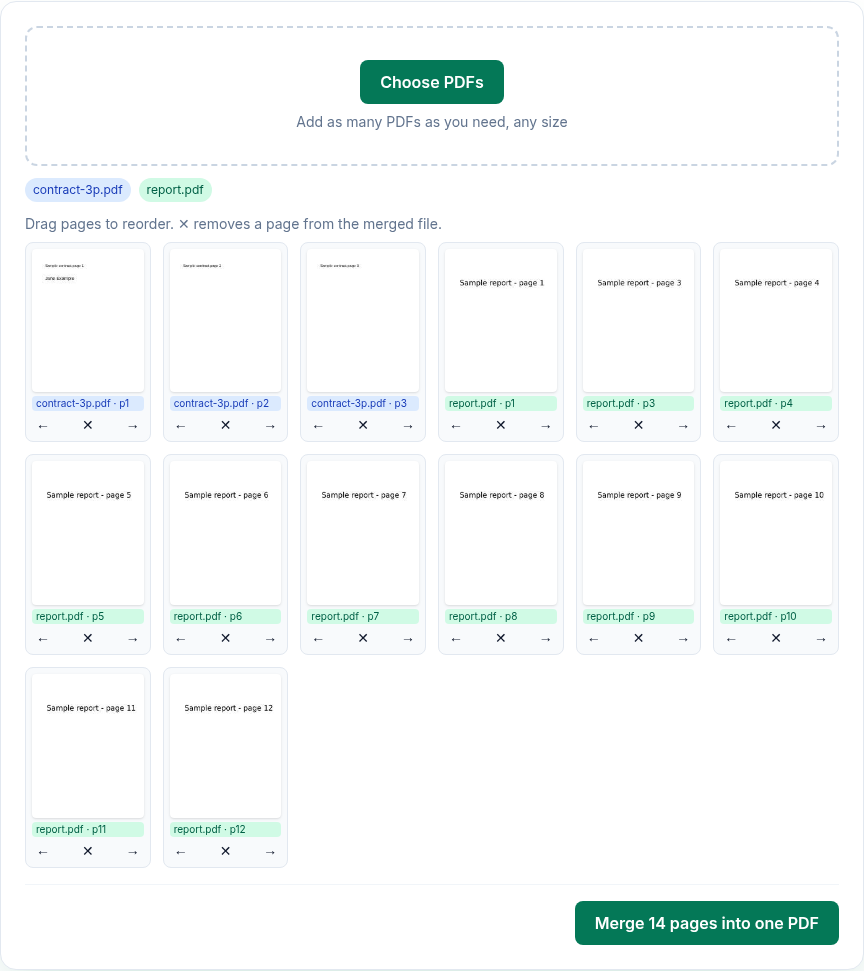
- It reads each PDF and shows a thumbnail of every page, labelled with the file name and page number. Each file gets its own label colour.
- You can drag a page to a new position, move it one step with the ← and → buttons, or remove it with ✕. As the tool says: "Drag pages to reorder. ✕ removes a page from the merged file."
- When you click Merge, it copies the pages you kept, in that order, into a new PDF and downloads it as
merged.pdf. - Pages are copied, not re-rendered. Text stays selectable and images aren't recompressed.
What it doesn't do
- It doesn't keep bookmarks or document properties. The merged PDF is a new document. In our test the original file's bookmarks and its title and author weren't in the merged file.
- Links inside the document stop working; web links are kept. In our test a link to a website still worked in the merged file, but a link that jumped to another page of the same PDF no longer pointed to any page.
- Form fields may stop working. In our test, the merged file no longer had a PDF form (pdfinfo reported "Form: none"), though the field's text still showed on the page. If you need a fillable form, fill it in first, or keep it as a separate file.
- It doesn't open password-protected PDFs. Such files are skipped with the message "can't open (encrypted or damaged)". Remove the password with Unlock PDF first, using the password you already have.
- It doesn't make the file smaller. If the merged PDF is too big to send, run it through Compress PDF.
How to merge PDFs
- Open Merge PDF and click Choose PDFs, or drop the files on the page. You can add more files at any time; their pages go to the end of the list.
- Wait until "Rendering pages…" disappears. Every page now has a thumbnail.
- Drag pages into the order you want, or use ← and →. Click ✕ on any page you want to leave out.
- Click Merge N pages into one PDF. The button shows how many pages the merged file will have.
- The browser downloads
merged.pdf. Rename it if you need to.
What we found when we tested it
We ran the live tool on October 21, 2026 (PT) in headless Google Chrome 155 on Linux with sample files we made: a 3-page contract with a title, author, three bookmarks and one form field, a 12-page report, and a copy of the contract protected with an open password.
| What we did | Result |
|---|---|
| Added all three files at once | The password-protected file was skipped with "locked-password.pdf: can't open (encrypted or damaged)". The other two loaded: 15 thumbnails. |
| Removed page 2 of the report with ✕ | The button changed to "Merge 14 pages into one PDF". |
| Merged | merged.pdf, 14 pages, 65,399 bytes, all letter-size pages. The contract's text was still selectable. |
| Checked the merged file | No bookmarks. Title and author empty; Creator and Producer set to pdf-lib. No PDF form ("Form: none"). |
| Merged a 2-page file with a web link, a link to its page 2, two bookmarks, a title, an author and a filled-in form field, followed by the contract | The web link still worked. The link to page 2 no longer pointed to a page in the merged file. No bookmarks, title, author or PDF form; the filled-in text was still visible on the page. |
Troubleshooting
- "
: not a PDF". The file doesn't end in .pdf and isn't reported as a PDF by your system. If it's a photo or scan, convert it with Image to PDF first, then merge. - "
: can't open (encrypted or damaged)". If it asks for a password when you open it, unlock it first. If it doesn't, the file may be damaged; open it in another viewer and save a new copy. - "Merge failed: …" The message after the colon comes from the PDF library. Try merging fewer files at a time to find the one causing it.
- It's slow with many pages. Thumbnails are drawn for every page in your browser. Very large batches depend on your device's memory, so merge in smaller groups if the tab struggles.
Limits and privacy
- There's no limit on the number or size of files in the tool. The practical limit is your device's memory.
- Merging runs in your browser tab with pdf.js (for thumbnails) and pdf-lib (to build the new file). Your files aren't uploaded. When we watched the network traffic during our tests, no request carried a file or a file name.
- The site sends anonymous statistics: Cloudflare Web Analytics counts page visits, and each merge sends one event with the tool name, whether it worked and a file-size range. No event is sent if Global Privacy Control or Do Not Track is on. See the privacy policy.
FAQ
Is there a limit on how many PDFs I can merge?
No. Add as many as you need. Very large batches depend on your device's memory, because merging happens in your browser.
Can I take pages from different files and mix them?
Yes. All pages from all files are in one list, so you can put page 3 of one file between two pages of another.
Will my bookmarks survive the merge?
No. In our test the merged file had no bookmarks, title or author. If you need bookmarks, add them again in a PDF editor after merging.
Can I merge a password-protected PDF?
Not directly. Remove the password with Unlock PDF, using the password you already know, then merge the unlocked copy.
Does merging lower the quality?
No. Pages are copied into the new file, so text stays selectable and images aren't recompressed.
Sources
- PDFWrangle Merge PDF, live tool and production code (
/_next/static/chunks/979.95bce41bf995d993.js), checked October 21, 2026: https://pdfwrangle.com/merge-pdf - PDFWrangle privacy policy, sections 1 and 2: https://pdfwrangle.com/privacy
- PDFWrangle usage statistics script: https://pdfwrangle.com/stats.js
More guides
All PDFWrangle guides · How to Compress a PDF (and Why Some PDFs Won't Shrink) · How to Split a PDF, Extract Pages or Delete Pages · How to Convert JPG and PNG Images to a PDF · How to Convert iPhone HEIC Photos to PDF · How to Remove a Password or Restrictions from a PDF · How to Sign a PDF by Drawing or Typing Your Signature