What the tool does
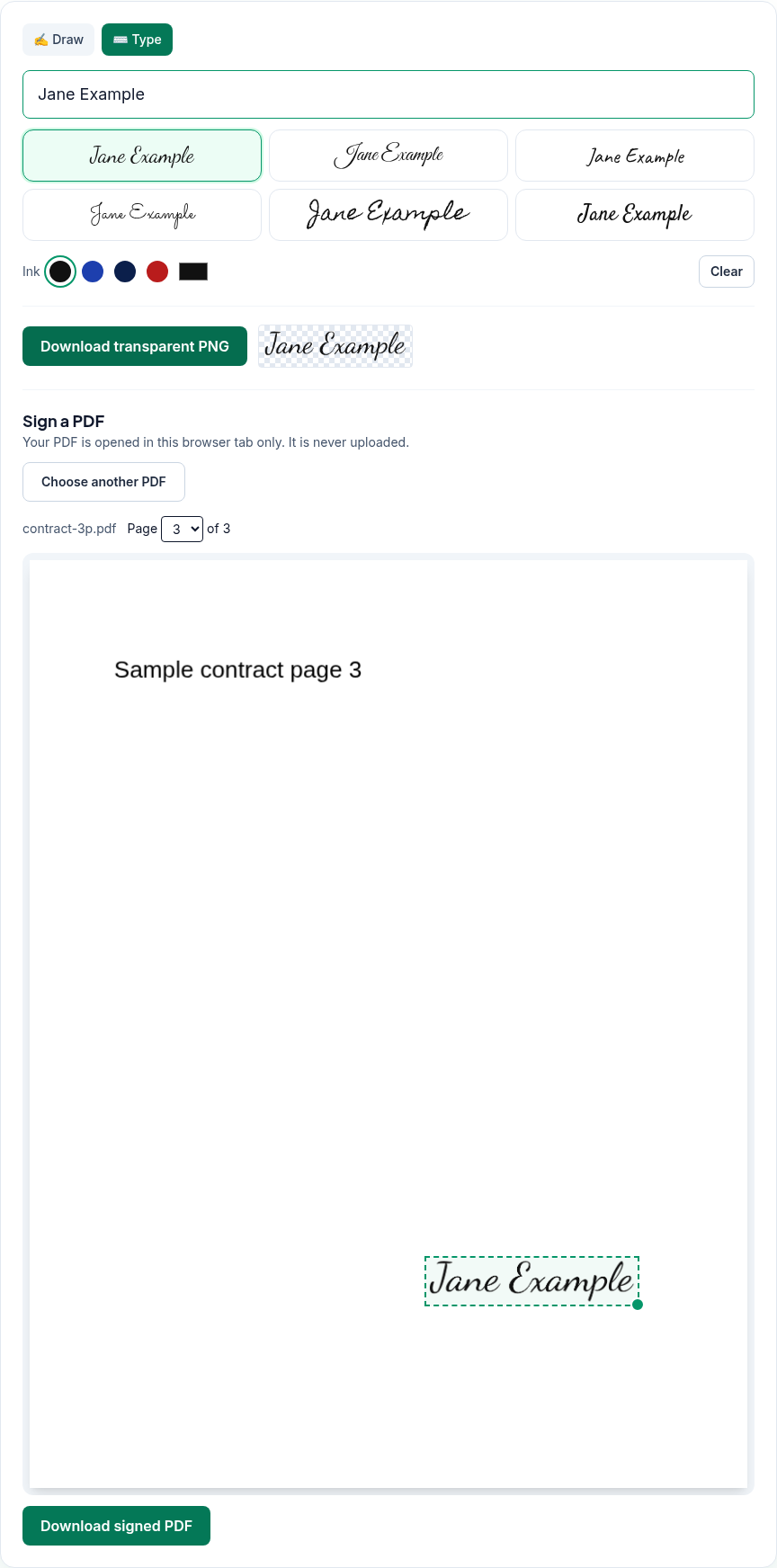
- Draw (the default) or Type a signature. Typing offers six handwriting fonts: Dancing Script, Great Vibes, Caveat, Sacramento, Homemade Apple and Satisfy.
- Choose the Ink colour (Black, Blue, Navy, Red or any custom colour) and, when drawing, the Stroke thickness. Undo and Clear fix mistakes.
- Download transparent PNG saves the signature on its own as
signature.png, trimmed to the signature with a transparent background, so you can use it elsewhere. - Open a PDF, pick the page, drag the signature into place and drag its corner handle to resize it. Download signed PDF saves
<name>-signed.pdf.
What it doesn't do
- It doesn't create a certificate-based digital signature. The signature is added as an image. There's no signing certificate and no tamper seal. If someone has asked for a "digital signature" with a certificate, or wants you to sign through their own e-signature service, this isn't that. Whether a picture of your signature is enough is up to whoever asked you to sign.
- It places one signature per download. To sign several pages, or add initials as well, download the signed PDF, open that file again and add the next signature.
- It doesn't fill in form fields or add dates or text. It only places the signature image.
- It doesn't open password-protected PDFs. You'll see "Could not open this PDF. It may be encrypted or damaged." Remove the password with Unlock PDF first, using the password you already know.
How to sign a PDF
- Open Sign PDF.
- Create your signature:
- Draw: sign in the box with your mouse, finger or stylus.
- Type: click Type, enter your name and pick a font. Then choose the ink colour.
- Under Sign a PDF, click Choose PDF. The first page is shown.
- If the PDF has more than one page, choose the page from Page … of ….
- Drag the dashed signature box to where you want it, and drag the round handle at its bottom-right corner to resize it.
- Click Download signed PDF. The signed copy is saved as
<name>-signed.pdf; your original isn't changed.
What we found when we tested it
We tested the live tool on October 21, 2026 (PT) in headless Google Chrome 155 on Linux. We typed "Jane Example" in the default font and colour, downloaded the PNG, then signed page 3 of a 3-page sample PDF we made (with a title, author, three bookmarks and a filled-in form field), leaving the signature box where the tool first placed it.
| Check | Result |
|---|---|
| Signature PNG | signature.png, 18,374 bytes |
| Signed PDF | contract-3p-signed.pdf, 3 pages, 13,542 bytes |
| Where the signature went | One image (483×113 pixels, with a transparency mask) on page 3 only, in the lower right, 30% of the page width |
| Rest of the document | Text, title, author, bookmarks and form field were the same as in the original. The Producer field changed to pdf-lib. |
| Digital signature | pdfsig reported that the file "does not contain any signatures", as expected for an image signature |
Troubleshooting
- "Create a signature above first." You opened a PDF before making a signature. Draw or type one, and the box appears on the page.
- "Could not open this PDF. It may be encrypted or damaged." If the PDF asks for a password, unlock it first. Otherwise download a fresh copy of the file.
- "Signing failed: …" Try again with a fresh copy of the PDF. If it keeps failing, the file may be damaged.
- The typed signature looks plain. Pick another font, or switch to Draw.
- I need my signature on several pages. Sign one page, download, then open the signed file and sign the next page.
Limits and privacy
- The handwriting fonts are served from pdfwrangle.com, not from a third-party font service.
- Your PDF and signature stay in your browser tab; the tool says "Your PDF is opened in this browser tab only. It is never uploaded." In our test, no request carried the PDF, the signature or a file name.
- The site sends anonymous statistics: Cloudflare Web Analytics counts page visits, and each signed download sends one event with the tool name, whether it worked and a file-size range. Signatures are never included. No event is sent if Global Privacy Control or Do Not Track is on. See the privacy policy.
FAQ
Is this a legally binding signature?
PDFWrangle adds a picture of your signature; it doesn't add a certificate-based digital signature. Whether that's acceptable depends on the document and on whoever asked for it, so check with them if you're unsure.
Can I sign on my phone?
The Draw pad accepts touch input, so you can sign with your finger, or use Type instead. Our own test ran in desktop Chrome only.
Can I sign more than one page?
Yes, one page at a time. Download the signed PDF, open it again and add the next signature.
Can I save my signature for later?
Click Download transparent PNG to save it as an image file. The tool doesn't keep it for you.
Does signing change the rest of my PDF?
In our test, no. The text, document properties, bookmarks and form field stayed the same; only the signature image was added.
Sources
- PDFWrangle Sign PDF, live tool and production code (
/_next/static/chunks/643.d82921fb2d64fadc.js), checked October 21, 2026: https://pdfwrangle.com/sign-pdf - Signature drawing pad (touch and pointer input):
/_next/static/chunks/500.5e6bd0fdd8b98d1d.js, same site - PDFWrangle privacy policy, section 2 (fonts served from the site, statistics): https://pdfwrangle.com/privacy
- PDFWrangle usage statistics script: https://pdfwrangle.com/stats.js
More guides
All PDFWrangle guides · How to Compress a PDF (and Why Some PDFs Won't Shrink) · How to Merge PDF Files and Put the Pages in Order · How to Split a PDF, Extract Pages or Delete Pages · How to Convert JPG and PNG Images to a PDF · How to Convert iPhone HEIC Photos to PDF · How to Remove a Password or Restrictions from a PDF