How to merge PDFs on a Mac
- Select the PDFs in Finder and drag them onto the tool, or click Choose PDFs.
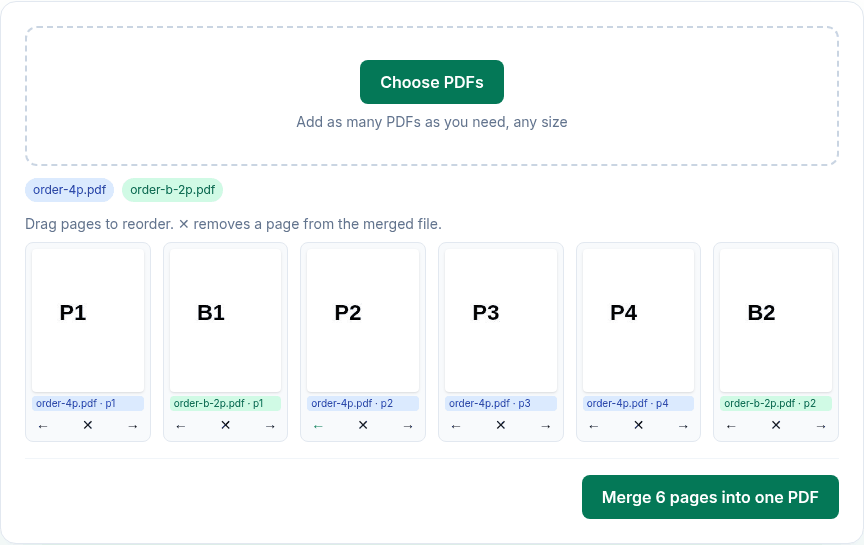
- Every page appears as a thumbnail, in file order. Drag pages, or use ← and →, to mix them.
- Click ✕ on pages you don't want, such as cover sheets or blank pages.
- Click Merge N pages into one PDF. Safari or Chrome saves
merged.pdfto Downloads.
What we found when we tested it
We ran the live tool on October 22, 2026 (PT) in headless Google Chrome 155 on Linux, with sample files we made for the test. We merged a 4-page file (pages P1–P4) with a 2-page file (B1–B2) and moved B1 to second place.
| Check | Result |
|---|---|
| Page order in merged.pdf | P1, B1, P2, P3, P4, B2: exactly as arranged |
| Text | Still selectable; pages are copied, not re-rendered |
| Not carried over | Bookmarks, document title and author, form fields, links to other pages in the same file |
Preview vs this tool
| Preview (built into macOS) | This tool | |
|---|---|---|
| How | Open one PDF, choose View > Thumbnails, drag other PDFs or pages into the sidebar | Drop all the files at once, arrange one list of pages |
| Original file | Changed, and changes save automatically. Apple suggests File > Duplicate first. | Never changed; you get a new merged.pdf |
| Works offline | Yes | Needs the page to load once |
| Cost | Free | Free |
If you only merge two files now and then, Preview is fine. This tool helps with many files, with mixing pages, and when you don't want to risk changing an original.
Limits
- No limit on the number of files, but each page is rendered as a thumbnail in your browser, so very large batches depend on your Mac's memory.
- Password-protected PDFs are skipped; unlock them first with Unlock PDF.
Privacy
The work happens in your browser tab, so your files aren't uploaded. The site counts page visits and sends one anonymous event per use (tool name, whether it worked, a file-size range). No event is sent when Global Privacy Control or Do Not Track is on. See the privacy policy.
Related tools
- Merge PDF: the main tool
- Reorder PDF pages
- Compress PDF on Mac: if the merged file is too big
- Split PDF on Mac
- Sign PDF on Mac
Sources
- Apple Preview User Guide, "Combine PDFs in Preview on Mac": https://support.apple.com/guide/preview/combine-pdfs-prvw43696/mac
- PDFWrangle Merge PDF, live tool, checked October 22, 2026: https://pdfwrangle.com/merge-pdf