How to change the page order
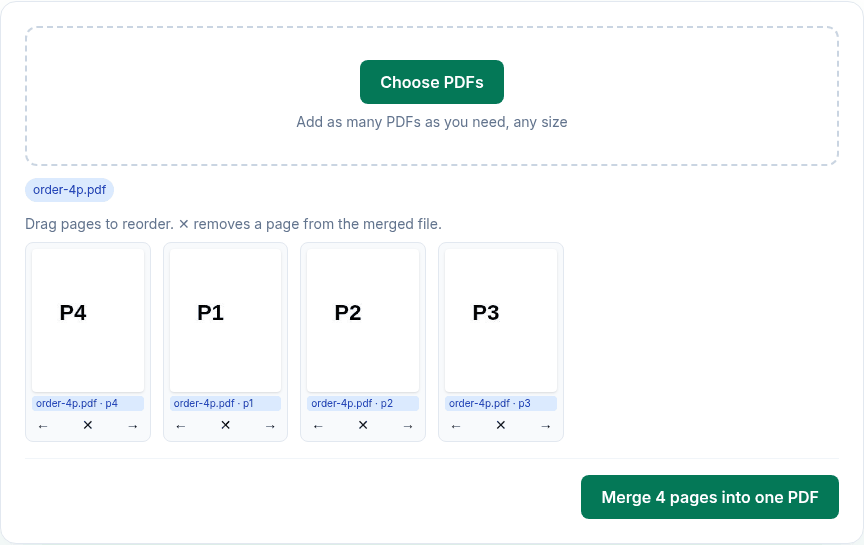
- Click Choose PDFs and pick your PDF. Wait until every page has a thumbnail.
- Drag a page to its new position. On a phone, or for exact moves, use ← and → under the page instead.
- Click ✕ on any page you want to leave out.
- Click Merge N pages into one PDF. The reordered copy downloads as
merged.pdf; your original isn't changed.
What we found when we tested it
We ran the live tool on October 22, 2026 (PT) in headless Google Chrome 155 on Linux, with sample files we made for the test. Our test PDF had four pages labelled P1 to P4, so we could read the order back out of the downloaded file.
| What we did | Order in the downloaded PDF |
|---|---|
| One file: ← three times on page 4, then ✕ on page 2 | P4, P1, P3 (3 pages) |
| One file: dragged page 3 to the front with the mouse | P3, P1, P2, P4 |
| Same ← and ✕ steps on iPhone 13 and Pixel 7 emulation, by touch | P4, P1, P3 on both |
| Two files (P1–P4 and B1–B2): moved B1 after P1 | P1, B1, P2, P3, P4, B2 |
Pages are copied as they are, so text stays selectable and images aren't recompressed. Links to websites keep working; bookmarks, the document title and author, form fields and links to other pages of the same file are not carried over.
On a Mac you can also use Preview
Apple's Preview can move pages too: choose View > Thumbnails and drag the thumbnails into a new order. Preview edits the file in place and saves automatically, so Apple suggests File > Duplicate first if you want to keep the original. This tool always gives you a new copy.
Limits
- Pages can't be rotated here.
- Password-protected PDFs have to be unlocked first with Unlock PDF, using the password you already have.
- Every page is rendered as a thumbnail in your browser, so very long PDFs take a while and depend on your device's memory.
Privacy
The work happens in your browser tab, so your files aren't uploaded. The site counts page visits and sends one anonymous event per use (tool name, whether it worked, a file-size range). No event is sent when Global Privacy Control or Do Not Track is on. See the privacy policy.
Related tools
- Merge PDF: the same tool, for combining files
- Delete pages from PDF
- Extract pages from PDF
- Split PDF
- Merge PDF on Mac
Sources
- Apple Preview User Guide, "Add, delete, or move pages in a PDF in Preview on Mac": https://support.apple.com/guide/preview/add-delete-or-move-pages-prvw11793/mac
- PDFWrangle Merge PDF, live tool, checked October 22, 2026: https://pdfwrangle.com/merge-pdf